Postmortem Blinded by the Light

On mobile, "Replies: X" and "Today at X" are two different font sizes. Could you please make them the same size?
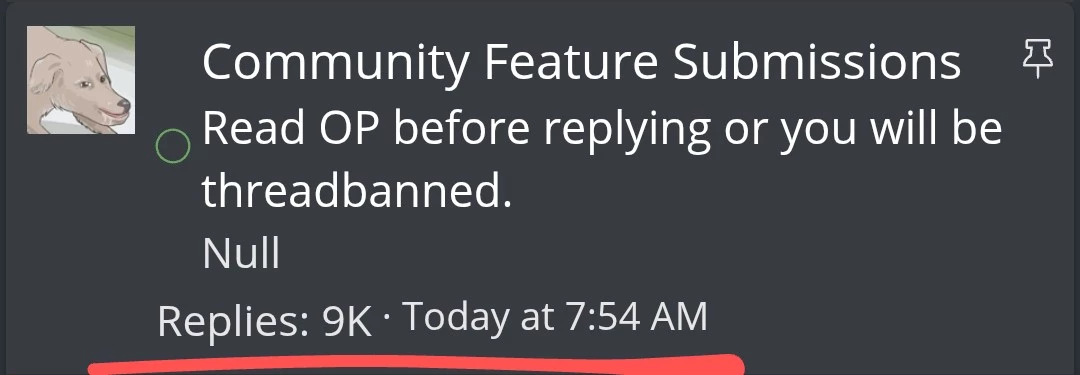
mobile_thread_misaligned.webp
 
I’m not a fan of having to scroll through each individual dm message I’ve sent when I’m looking at the “postings” tab on my profile. I don’t remember if it was like this before, but I don’t think it was.
 
@Null I see that you're still trying to get the highlight buttons to look just right. Out of boredom I decided to also mess about with the CSS a bit and would like to propose this as a potential layout:
1745989987951.webp


In my humble opinion if you were to separate the highlight buttons into a separate <div> with a small spacer it'd look a bit cleaner, considering they're currently the only buttons in that row made purely out of icons. I'd also suggest having the "award" icon as a separate, unclickable button, that way the arrow buttons would be symmetrical on both sides, rather than having the compromise of the "award" and the arrow sharing the same button.
 
Not sure if this is working as intended, but when there are posts on the page present by a user you've ignored the button to unhide the posts appears by the bottom right highlight buttons and nowhere else:
1746075795600.webp
 
Seems the set width for .structItem-cell--featureDate (140px) in Community Feature Submissions is not wide enough for the Wednesday feature dates and is splitting them into two lines:
1746764465773.webp


Increasing it from 140px to 150px fixes it:
1746764537775.webp
 
Quiet a bit late, but the non-existent color separation for embedded posts in the community happenings thread made me, by pressing the middle mouse button trying to use auto-scroll, open a thread I didn't want to open one too many times. It's especially bad with the standard light theme, as there isn't even a visible outline around embedded posts.

I personally now just use this CSS, which works with all current themes except for the high contrast one as that one doesn't seem to define most of the color variables. Admittedly it is maybe a bit too contrasty but I couldn't get CSS's color-blend function to work, still thought I'd share it if someone else also wants to use it with an add-on like Stylus or if Null wants to implement something similar.
Code:
.embed.fauxBlockLink {
  border-left: 3px solid hsla(var(--xf-paletteAccent1));
  background: hsla(var(--xf-buttonPrimaryBg));
}
Comparison:
dark-standard.webp
dark-changed.webp
light-standard.webp
light-changed.webp
 
Back
Top Bottom