- Joined
- Apr 14, 2021
Welcome to Kiwi Farms!
You'll get used to the site more as you use it, but I thought it would be nice to have a brief guide covering the most important things for new users who want to acclimate more quickly. There's a few unspoken (and some spoken) rules here that you're best off learning sooner rather than later.
Very short version:
The Various Forums
The first thing you'll notice on the homepage after "community features" are the number of available forums or boards.
The green boards, including the Lolcows ("On-Topic boards") and Lolcow Meta board groupings are fairly self explanatory, but the main rule that's often forgotten is that we are here to observe and document the cows, not to interact with them. Interacting with lolcows to try to "milk" them—often called "cow tipping", "touching the cow", "weening", or "pozloading my neghole"—is not only heavily frowned upon but may earn you a warning or a ban. Don't do it, don't talk about doing it, don't suggest others do it, don't outline how it could be done, and don't make implications about it.
The blue boards, officially the "Off-Topic" boards, are much more relaxed. The Q&A board in particular is used almost exclusively for shitposting.
The pink boards, officially the "Lolcow Salon", are specifically targeted at women. Since having a high concentration of women anywhere tends to attract certain types of men who want to shit it up (see also: troons), the Salon is more strictly moderated and has additional rules like no thirstposting (technically sitewide but much more strict here) and no rank misogyny. If you are male and you decide to post here, mind your manners.
The red boards, officially the "Autism Thunderdome", have more relaxed rules which can be found here. There aren't many special rules there and the ones they do have are very easy to follow so there's really not much excuse for breaking them. Derailments in other threads, including threads on other boards, are often moved to Mass Debates. Articles & News is perhaps the most notorious of the red boards as you must fail an IQ test to be allowed to post there.
The orange boards, officially the "Interior", are for discussion about the site itself. If you need help from staff, you can create a thread in the "Talk to Staff" board. Threads in this board are not visible to other users, only to yourself and to staff members.
The Interior is also home to our lovely random_text.txt thread, which serves as a sort of "bash.org" for the site. If you find a quote on the site that made you laugh particularly hard and is funny out of context, feel free you quote it and post it there!
Common rules
Some rules apply to all boards on the site. The most important of these rules is to avoid infighting. Don't get into slapfights with other users, don't post replies to users in a more favorable venue to encourage others to join in, don't screenshot posts on the site as a call to action, and avoid arguing with other users. Agree to disagree, and if someone is being disruptive then report the offending post. Don't follow users around the site or tag them into threads without a good reason.
Other common rules include: staying on topic, avoiding "double posting" (making two posts where one would suffice), keeping your posts safe for work, spoilering NSFW content when it absolutely must be posted, speaking normal English instead of niggerbabble, refraining from posting "nontent" (e.g. "no1curr", "I have nothing to contribute"), and of course...
Thumbnailing your images
I highly recommend reading this thread before posting images. It explains how image attachments work and how to thumbnail them:
https://kiwifarms.net/threads/we-ha...ot-being-able-to-figure-out-thumbnails.113862
If you prefer to use the BB Code editor when making your posts, you can thumbnail full size image very quickly by deleting the text highlighted in red:

Just make sure the beginning has the right bracket flush with the H!
Short version: When you attach an image to your post, make sure to thumbnail it. Don't worry about whether your embedded images are legible, they don't need to be. The thumbnail's only job is to tell users the general content of what's in the image so they can decide if they want to load it themselves. If you paste an image from your clipboard then make sure to delete the embed and then hit insert>thumbnail on the attachment.
Quoting and replying
At the bottom of each post in threads you are allowed to post in, you'll see these two buttons:

When you want to reply to an entire post, click the "Reply" button. When you'd like to cite their entire post elsewhere (not to brigade them, but to cite a post that's relevant to the discussion!), use the "+ Quote" button. While a quote is selected, you'll see a new button next to "Attach files" below the text input field:

Click "Insert quotes..." to bring up a list of the selected quotes. All selected quotes will be added to your text input field unless you click "Delete" to deselect them.
In most cases you'll only want to reply to a small part of a post. In this case, highlight the text you'd like to reply to and click whichever button fits best:
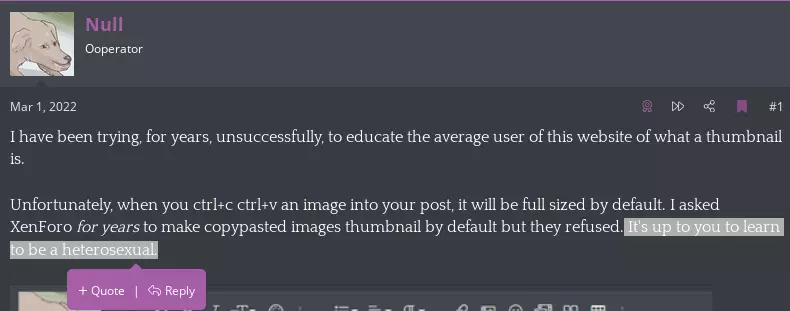
If these two buttons do not show up, try selecting the text from the left and then dragging rightward. If this doesn't work, the post may not be available to reply to (for instance, it may be in Spergatory).
If the "Quote" and "Reply" buttons look like this, this is because the post is too long or you're trying to quote the OP, and you may only reply using the above method.

Posting links and off-site content, or how to archive
If you would like to post content that is hosted on a different site, especially in the Lolcow boards, please archive it first following the instructions in this thread.
Deleting posts
We generally don't delete posts, so please be careful to avoid sharing embarrassing or revealing information (also known as "power leveling" or "PLing"). If a post violates your legal rights or is otherwise harmful, please report it or create a thread in Talk to Staff.
The reaction system
When you hover your cursor over the "like" button on a post (or long press the "like" button if you're on mobile), you'll see this palette of icons come up:

If your account doesn't have the "True & Honest Fan" tag given to donators then yours will have a few less icons. Each of these icons ("reactions" or "stickers"/"stickies") represents a different response to a post. These are there to reduce the number of simple replies like "I agree" or "lol calm down". Generally speaking, posting replies that could be conveyed with the reaction system is heavily frowned upon and may be deleted by moderators for cluttering up the site.
You can find a more in-depth albeit slightly outdated guide to the reactions here. Please note that the "reaction score" feature is hidden as many users began to treat the system as a literal score similar to Reddit karma. These users are often called "stickerfags" or "stickiefags" and are to be relentlessly mocked. While reactions can be used to briefly gauge others' thoughts on a post, keep in mind that the reaction system exists as a way to reduce clutter rather than to pressure a consensus.
Writing an OP
If you're here to start a thread of your own then head over to the Prospering Grounds and read the stickied posts there! Please be sure to read this guide (and this one if you'd like to make sure you have your bases covered) prior to writing yours so you know what's expected of you. It would also be prudent to read threads written by veteran authors like @Admiral Throbnelius and @Osama Bin Laden to get an idea of what a good OP looks like. Please note that we do not allow threads on minors.
Remember: We are not an autistic Illuminati. If the goal of your thread is to get people to back you up in an argument or harass somebody then you are on the wrong site.
I hope you enjoy your time here, and don't forget: you're here forever!
You'll get used to the site more as you use it, but I thought it would be nice to have a brief guide covering the most important things for new users who want to acclimate more quickly. There's a few unspoken (and some spoken) rules here that you're best off learning sooner rather than later.
Very short version:
- Do not try to interact with the cows.
- Always thumbnail your images. How to do that.
- Do not doublepost. Use the +Quote button to reply to multiple posts at once.
- Do not post "nontent": use post reactions to avoid simple messages like "I agree".
- Archive off-site links. Archival tools 101.
- Speak like a normal human.
- Stay on-topic.
- Do not antagonize other users.
- Kiwi Farms is a safe for work site, if you must post something NSFW then bookend it with [SPOILER="NSFW"] and [/SPOILER]
- Use of the site is a privilege, not a right. Behave yourself.
- Don't backseat moderate. Use the Report button instead of posting to tell other users what to do.
The Various Forums
The first thing you'll notice on the homepage after "community features" are the number of available forums or boards.
The green boards, including the Lolcows ("On-Topic boards") and Lolcow Meta board groupings are fairly self explanatory, but the main rule that's often forgotten is that we are here to observe and document the cows, not to interact with them. Interacting with lolcows to try to "milk" them—often called "cow tipping", "touching the cow", "weening", or "pozloading my neghole"—is not only heavily frowned upon but may earn you a warning or a ban. Don't do it, don't talk about doing it, don't suggest others do it, don't outline how it could be done, and don't make implications about it.
The blue boards, officially the "Off-Topic" boards, are much more relaxed. The Q&A board in particular is used almost exclusively for shitposting.
The pink boards, officially the "Lolcow Salon", are specifically targeted at women. Since having a high concentration of women anywhere tends to attract certain types of men who want to shit it up (see also: troons), the Salon is more strictly moderated and has additional rules like no thirstposting (technically sitewide but much more strict here) and no rank misogyny. If you are male and you decide to post here, mind your manners.
The red boards, officially the "Autism Thunderdome", have more relaxed rules which can be found here. There aren't many special rules there and the ones they do have are very easy to follow so there's really not much excuse for breaking them. Derailments in other threads, including threads on other boards, are often moved to Mass Debates. Articles & News is perhaps the most notorious of the red boards as you must fail an IQ test to be allowed to post there.
The orange boards, officially the "Interior", are for discussion about the site itself. If you need help from staff, you can create a thread in the "Talk to Staff" board. Threads in this board are not visible to other users, only to yourself and to staff members.
The Interior is also home to our lovely random_text.txt thread, which serves as a sort of "bash.org" for the site. If you find a quote on the site that made you laugh particularly hard and is funny out of context, feel free you quote it and post it there!
Common rules
Some rules apply to all boards on the site. The most important of these rules is to avoid infighting. Don't get into slapfights with other users, don't post replies to users in a more favorable venue to encourage others to join in, don't screenshot posts on the site as a call to action, and avoid arguing with other users. Agree to disagree, and if someone is being disruptive then report the offending post. Don't follow users around the site or tag them into threads without a good reason.
Other common rules include: staying on topic, avoiding "double posting" (making two posts where one would suffice), keeping your posts safe for work, spoilering NSFW content when it absolutely must be posted, speaking normal English instead of niggerbabble, refraining from posting "nontent" (e.g. "no1curr", "I have nothing to contribute"), and of course...
Thumbnailing your images
I highly recommend reading this thread before posting images. It explains how image attachments work and how to thumbnail them:
https://kiwifarms.net/threads/we-ha...ot-being-able-to-figure-out-thumbnails.113862
If you prefer to use the BB Code editor when making your posts, you can thumbnail full size image very quickly by deleting the text highlighted in red:
Just make sure the beginning has the right bracket flush with the H!
When you attach images to a post, you can either leave them as attachments at the bottom (which looks a little sloppy) or embed them in the post. When you embed an image you can embed it as either a "full sized image" or as a thumbnail. "Full sized image" is a bit of a misnomer because it's not necessarily related to the size or resolution of the image.
When you paste an image into your post directly from your clipboard or when you use the "insert image" feature on the toolbar, the image will automatically be embedded as "full size". Embedding a "full size" image means that whenever someone loads the page with your post, the entire image is loaded with it. Since a bunch of users connect through Tor, with slow VPNs, or with slow Internet connections, this is generally considered a bad idea.
Embedding as a thumbnail just loads a thumbnail with the page and allows users to load the images separately at their discretion when they click on a thumbnail. This ensures that the website loads much more quickly, and it also reduces strain on the server by reducing the amount of data the server is required to send when a page is accessed. Generally speaking you should always embed image attachments as thumbnails for these reasons.
When you do paste an image from your clipboard make sure to delete the embed and then hit insert>thumbnail on the attachment!
One common mistake is people embedding a full image and then resizing it manually. Resizing an embed manually doesn't actually change the resolution or "size" (in terms of data) of the image, it just stretches it. Don't worry about making a thumbnail big enough to read, it doesn't need to be. The thumbnail's only job is to tell users the general content of what's in the image so they can decide if they want to load it themselves. Personally, I often manually resize my thumbnails to be smaller so they don't take up as much (visual) space.
Mistakes happen all the time so you probably won't be banned for failing to thumbnail an image here or there.
When you paste an image into your post directly from your clipboard or when you use the "insert image" feature on the toolbar, the image will automatically be embedded as "full size". Embedding a "full size" image means that whenever someone loads the page with your post, the entire image is loaded with it. Since a bunch of users connect through Tor, with slow VPNs, or with slow Internet connections, this is generally considered a bad idea.
Embedding as a thumbnail just loads a thumbnail with the page and allows users to load the images separately at their discretion when they click on a thumbnail. This ensures that the website loads much more quickly, and it also reduces strain on the server by reducing the amount of data the server is required to send when a page is accessed. Generally speaking you should always embed image attachments as thumbnails for these reasons.
When you do paste an image from your clipboard make sure to delete the embed and then hit insert>thumbnail on the attachment!
One common mistake is people embedding a full image and then resizing it manually. Resizing an embed manually doesn't actually change the resolution or "size" (in terms of data) of the image, it just stretches it. Don't worry about making a thumbnail big enough to read, it doesn't need to be. The thumbnail's only job is to tell users the general content of what's in the image so they can decide if they want to load it themselves. Personally, I often manually resize my thumbnails to be smaller so they don't take up as much (visual) space.
Mistakes happen all the time so you probably won't be banned for failing to thumbnail an image here or there.
Short version: When you attach an image to your post, make sure to thumbnail it. Don't worry about whether your embedded images are legible, they don't need to be. The thumbnail's only job is to tell users the general content of what's in the image so they can decide if they want to load it themselves. If you paste an image from your clipboard then make sure to delete the embed and then hit insert>thumbnail on the attachment.
Quoting and replying
At the bottom of each post in threads you are allowed to post in, you'll see these two buttons:
When you want to reply to an entire post, click the "Reply" button. When you'd like to cite their entire post elsewhere (not to brigade them, but to cite a post that's relevant to the discussion!), use the "+ Quote" button. While a quote is selected, you'll see a new button next to "Attach files" below the text input field:
Click "Insert quotes..." to bring up a list of the selected quotes. All selected quotes will be added to your text input field unless you click "Delete" to deselect them.
In most cases you'll only want to reply to a small part of a post. In this case, highlight the text you'd like to reply to and click whichever button fits best:
If these two buttons do not show up, try selecting the text from the left and then dragging rightward. If this doesn't work, the post may not be available to reply to (for instance, it may be in Spergatory).
If the "Quote" and "Reply" buttons look like this, this is because the post is too long or you're trying to quote the OP, and you may only reply using the above method.
Posting links and off-site content, or how to archive
If you would like to post content that is hosted on a different site, especially in the Lolcow boards, please archive it first following the instructions in this thread.
Deleting posts
We generally don't delete posts, so please be careful to avoid sharing embarrassing or revealing information (also known as "power leveling" or "PLing"). If a post violates your legal rights or is otherwise harmful, please report it or create a thread in Talk to Staff.
The reaction system
When you hover your cursor over the "like" button on a post (or long press the "like" button if you're on mobile), you'll see this palette of icons come up:
If your account doesn't have the "True & Honest Fan" tag given to donators then yours will have a few less icons. Each of these icons ("reactions" or "stickers"/"stickies") represents a different response to a post. These are there to reduce the number of simple replies like "I agree" or "lol calm down". Generally speaking, posting replies that could be conveyed with the reaction system is heavily frowned upon and may be deleted by moderators for cluttering up the site.
You can find a more in-depth albeit slightly outdated guide to the reactions here. Please note that the "reaction score" feature is hidden as many users began to treat the system as a literal score similar to Reddit karma. These users are often called "stickerfags" or "stickiefags" and are to be relentlessly mocked. While reactions can be used to briefly gauge others' thoughts on a post, keep in mind that the reaction system exists as a way to reduce clutter rather than to pressure a consensus.
Writing an OP
If you're here to start a thread of your own then head over to the Prospering Grounds and read the stickied posts there! Please be sure to read this guide (and this one if you'd like to make sure you have your bases covered) prior to writing yours so you know what's expected of you. It would also be prudent to read threads written by veteran authors like @Admiral Throbnelius and @Osama Bin Laden to get an idea of what a good OP looks like. Please note that we do not allow threads on minors.
Remember: We are not an autistic Illuminati. If the goal of your thread is to get people to back you up in an argument or harass somebody then you are on the wrong site.
I hope you enjoy your time here, and don't forget: you're here forever!
Last edited: