
Gaunt King Ithan Rilph
"Sargon is probably the tastiest person" - Josh
True & Honest Fan
kiwifarms.net
- Joined
- Apr 16, 2022
ShareX is a screen recording tool based on ffmpeg capable of outputting various formats, such as png, gif, mp4 and even animated webp (think gifs but better). I often use it to create animated webps from streams the moment something happens, and have been asked a few times on how to set it up. Guide might look lengthy, but it's mostly to make it retard-proof, there aren't that many steps.
Purpose: Screen record > Automatically uploads > Clipboard gets filled with a direct link to the upload, including img tags for sneedchat. (Will work just as well for regular png captures, no additional setup required).
Demonstration:
Important: Do you simply want an easy way to record content for thread posts? You can skip steps 3 and 4 in their entirety if you do not care about automatically uploading your content.
Another guide focusing more on video recording and clipping, using ShareX and other programs.


 CLIP IT AND SHIP IT
Almost all threads on the forum have a need to post video clips or archive large (live) video files on a regular basis. The tools needed to do so often require a learning curve or simply knowledge of their existence. This thread will serve as a resource to point to whenever media clipping or archiving is required.
These are my personal methods I use to feed the Bossman industrial clipping complex. By no means are these the best methods out there. The methods are however curated...
1.0 Download ShareX. It's open source and uses ffmpeg for encoding.
2.0. Setting up a hotkey for animated webp recording. (Default hotkeys for regular mp4 recording will already exist.)
3.0 Adding a custom uploader.
4.0. Automating your uploading.
5.0. Strongly recommended quality of life additions!
Purpose: Screen record > Automatically uploads > Clipboard gets filled with a direct link to the upload, including img tags for sneedchat. (Will work just as well for regular png captures, no additional setup required).
Demonstration:
Important: Do you simply want an easy way to record content for thread posts? You can skip steps 3 and 4 in their entirety if you do not care about automatically uploading your content.
Another guide focusing more on video recording and clipping, using ShareX and other programs.
 CLIP IT AND SHIP IT
These are my personal methods I use to feed the Bossman industrial clipping complex. By no means are these the best methods out there. The methods are however curated...
- Avenue
- Replies: 27
- Forum: Internet & Technology
Reactions: x 38 x 42 x 26 x 15 x 2
x 38 x 42 x 26 x 15 x 2
1.0 Download ShareX. It's open source and uses ffmpeg for encoding.
2.0. Setting up a hotkey for animated webp recording. (Default hotkeys for regular mp4 recording will already exist.)
2.1. Go to Hotkey settings... > Add... > Screen record > Start/Stop screen recording.
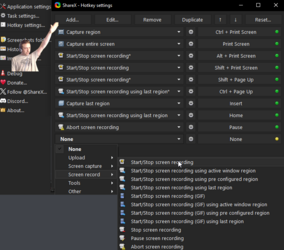
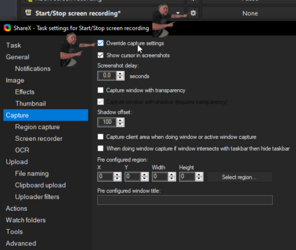
2.2. Click the cog on your new hotkey and navigate to Capture and check the "Override capture settings" (this is so you can record in different formats depending on which hotkey you use).
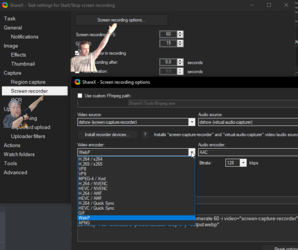
2.3. Go to "Screen recorder" and click "Screen recording options...", click "Video encoder" and select webp. (You might need to click "Install recorder devices" just above and set video source to "screen-capture-recorder).
2.2. Click the cog on your new hotkey and navigate to Capture and check the "Override capture settings" (this is so you can record in different formats depending on which hotkey you use).
2.3. Go to "Screen recorder" and click "Screen recording options...", click "Video encoder" and select webp. (You might need to click "Install recorder devices" just above and set video source to "screen-capture-recorder).
3.0 Adding a custom uploader.
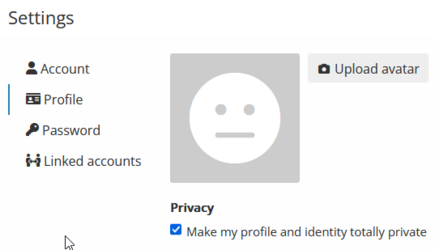
3.1. Make an account on imgbb (accepts temporary email services) and proceed to get your API key. (Optionally, set your account to private, direct links to images can still be viewed by anyone.)
3.2. Go to "Destinations" and set your "Image uploader" to custom.

3.3. Go to "Custom uploader settings" and after copying the code below, click "Import from clipboard".

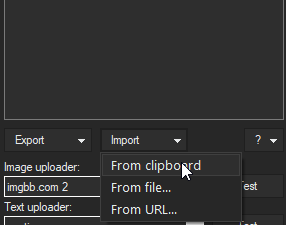
3.4. Delete the text in the Value bracket and paste your API key from step 3.1.
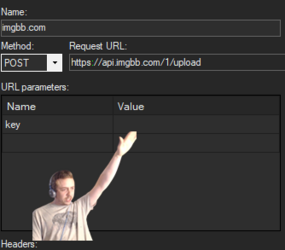
(imgbb might limit API keys based on use to prevent botting, after ~2500 uploads mine stopped working, but you can simply go to step 3.1 and request a new API key without making a new account)
3.2. Go to "Destinations" and set your "Image uploader" to custom.

3.3. Go to "Custom uploader settings" and after copying the code below, click "Import from clipboard".
Code:
{
  "Version": "15.0.0",
  "Name": "imgbb.com",
  "DestinationType": "ImageUploader",
  "RequestMethod": "POST",
  "RequestURL": "https://api.imgbb.com/1/upload",
  "Parameters": {
    "key": "your API key"
  },
  "Body": "MultipartFormData",
  "FileFormName": "image",
  "URL": "{json:data.url}",
  "ThumbnailURL": "{json:data.thumb.url}",
  "DeletionURL": "{json:data.delete_url}"
}
3.4. Delete the text in the Value bracket and paste your API key from step 3.1.
(imgbb might limit API keys based on use to prevent botting, after ~2500 uploads mine stopped working, but you can simply go to step 3.1 and request a new API key without making a new account)
4.0. Automating your uploading.
4.1. Go to "After capture tasks" and select "Upload image to host".
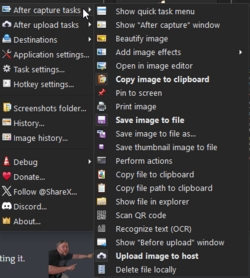
4.2. Go to "After upload tasks" and select "Copy URL to clipboard".
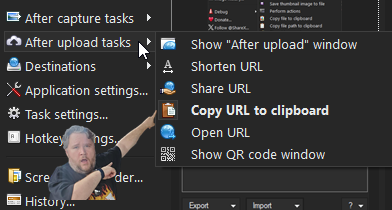
4.3. Go to Task settings... > Advanced and paste the following into "ClipboardContentFormat".
(This is mainly for sneedchat, and the url part is optional. If you leave it as "$result", you'll simply get a direct link)
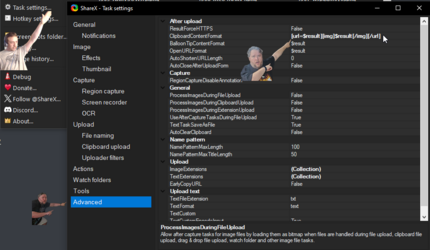
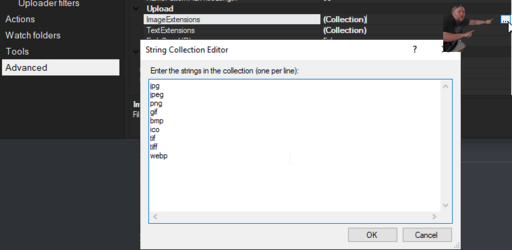
4.4. Stay on the same page and click the square in ImageExtensions, add "webp" to the list that pops up.
4.2. Go to "After upload tasks" and select "Copy URL to clipboard".
4.3. Go to Task settings... > Advanced and paste the following into "ClipboardContentFormat".
Code:
[url=$result][img]$result[/img][/url]
4.4. Stay on the same page and click the square in ImageExtensions, add "webp" to the list that pops up.
5.0. Strongly recommended quality of life additions!
5.1. Any global setting can be adjusted to act differently for individual hotkeys, for example @supersock12345 asked how to disable automatic uploading for a single hotkey, and it's as simple as clicking the cog on a hotkey and unchecking it in "after capture tasks"

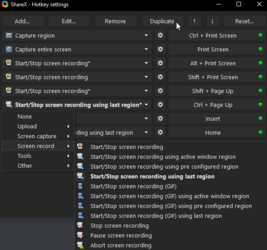
5.2. Go back to hotkeys and duplicate the hotkey you just finished setting up, change the new one to "Start/Stop screen recording using last region", you can also add an "Abort screen recording" hotkey. This allows you to skip selecting a region, and instead reuse the region you last used.
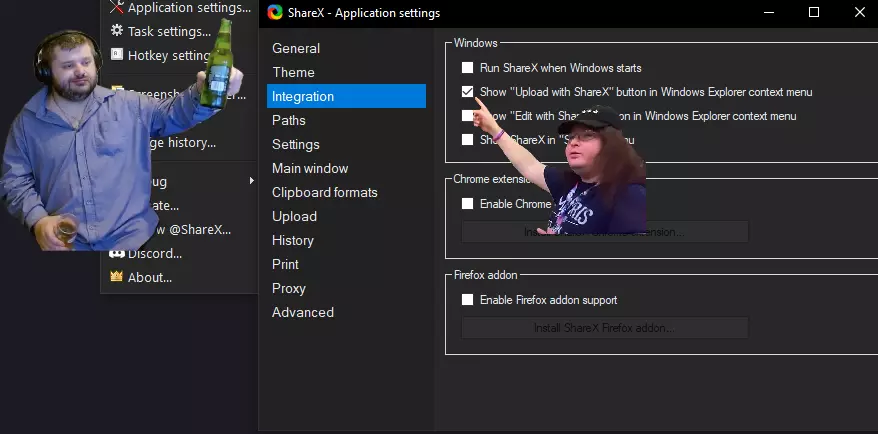
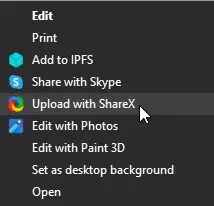
5.3. Right click a saved image to upload it the same way a screenshot would be. Go to "Application settings..." > "Integration" and check that little box.
WARNING: This will not strip exif data from say, photos you took with your phone. In that case I'd suggest taking a screencap of them to easily remove exif (if you're lazy and don't care about slightly reduced quality.)
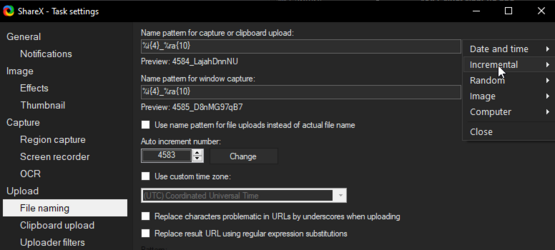
5.4. Change file naming system to what suits you. Go to "Task settings..." > "File naming". I like having an incremental number at the start (easy 'sort by name' in folder) followed by randomized letters.
WARNING: For maximum anonymity, do not add an incremental number as it could be cross referenced and tracked, though I'd say this is very low risk.
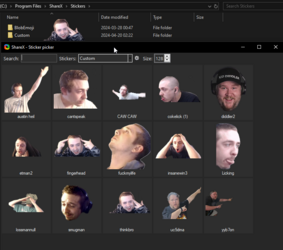
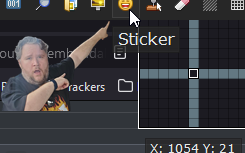
5.5. Custom stickers! (screenshots only, don't work for recording). Create a folder and add pictures, when taking a screenshot, click the smiley in the toolbar and have your custom folder selected.

5.2. Go back to hotkeys and duplicate the hotkey you just finished setting up, change the new one to "Start/Stop screen recording using last region", you can also add an "Abort screen recording" hotkey. This allows you to skip selecting a region, and instead reuse the region you last used.
5.3. Right click a saved image to upload it the same way a screenshot would be. Go to "Application settings..." > "Integration" and check that little box.
WARNING: This will not strip exif data from say, photos you took with your phone. In that case I'd suggest taking a screencap of them to easily remove exif (if you're lazy and don't care about slightly reduced quality.)
5.4. Change file naming system to what suits you. Go to "Task settings..." > "File naming". I like having an incremental number at the start (easy 'sort by name' in folder) followed by randomized letters.
WARNING: For maximum anonymity, do not add an incremental number as it could be cross referenced and tracked, though I'd say this is very low risk.
5.5. Custom stickers! (screenshots only, don't work for recording). Create a folder and add pictures, when taking a screenshot, click the smiley in the toolbar and have your custom folder selected.
DONE!

Last edited:


