The Linux Thread - The Autist's OS of Choice

  • Want to keep track of this thread?
    Accounts can bookmark posts, watch threads for updates, and jump back to where you stopped reading.
    Create account
Personally, after a month or two every non-declarative OS install just feels... bloated and trashed?
I hear people say this as a reason to move to Nix/Guix and I've never understood it. I only install packages on my machine that I need/use on a regular basis. The sole exception to this is development libraries for compiling programs. It's hard to remember everything I install to build from source, and APT marks them as manually installed so there's no easy way to automatically remove them when I no longer need them. My solution is to spin up a container, install the packages there, then my main machine isn't polluted with a bunch of shit I no longer need. I delete the container and then recreate it whenever the package count goes too high. If I want to try out a program without installing it to bare metal and leaving a bunch of configuration/cache/temp files I do that in the container too.

What am I missing here?
 

stumbled onto this. seems line a nice resource. This guy definitely put some time into this.


after a month or two every non-declarative OS install just feels... bloated and trashed?
After thinking about it for a second. This is completely insane to me.

With how nix, and as far as I know guix would handle this in the same, or a similar way. They are both so much more bloated than a system would otherwise be using a normal package manager. They can sometimes save some space on your disk with hardlinking. But you have this huge store of packages, with multiple versions of everything you need, especially if you have multiple derivations for backups. I would say you are going to take up significantly more disk space, for the same thing you would be using, but it's all shoved into the store. and split up there. instead of an organized complete filesystem structure you would expect.

When you update you update the whole store at once, so it's a giant download. So that's definitely not lighter.

You will probably have more runtime junk going on because of how these distros work (like the nix-daemon which consistently was using 1gb of memory every time I looked at it, or whatever other runtime setup needs to get done on guix). You will certainly have a giant mess of symlinks that make up your normal directory structure, if not in home etc will be all symlinks.

To me it feels way more bloated, messy, and complicated than a normal linux distro. I would say those distros are more bloated in every way except cpu usage in comparison to just running something like void, arch, or maybe alpine. Or gentoo if you are going to compile programs.

Oh yeah, also god forbid if you for some reason want to change something about a package, and dive into what would normally be in the /usr directory. You're just going to have to make the package yourself with whatever alterations you want to make, because otherwise there is no practical way to do it.
 
Debian capitulated to systemd so fast it was staggering.
You people need to get over yourself. Debian were very happy to move to systemd, it provided a much better experience for the user and is ever so much more practical for developers to use. Nobody wants to make init systems, which is why sysvinit was such a mess everyone was forced to tolerate because there just wasn’t a good alternative. If you don’t like systemd you can switch to a distro without it or make your own, or just shut up and keep using a systemd distro because it just works.
 
You people need to get over yourself.
You need to get over yourself. The point I was making is how readily Debian is making broad-impact technical changes without considering how it's perceived by its community. It did not used to be this trigger happy. Systemd marked the start of the contemporary misadventure. If you're too witless to understand that this is controversial behaviour I wonder how you managed to find this site.
 
and now its time to see if it worked
no...

I didn't compile glibc and appernetly there is a whole fucking process. So i got a genuis big brain move.

Sony used Monta Vista Linux, Well Monta Vista is a commercial Linux vendor so I sent a email.
1765376381247.png
Yeah fuck compiling that. I spent the rest of the day trying and trying.

I would rather stick needles up my balls than fucking compile that shit. Just close your eyes... ok... close them right now... Imagine getting the rustiest nail you can find.. Then slamming it into your balls and using sharp razor wire around it. I would rather be doing that shit than fucking compile This. Because its a whole process.

THERE ARE DIFFERENT STAGES TO COMPILING IT. You have to compile it barebones and then compile glibc and then compile it again and that is not counting binutils. And while doing it for a x86 target may be alot easier doing it for mipsel or a not as used architecture is ALOT harder and less documented. Were just going to go the big brain route.

In the menatime im taking a small break. About 1 day or so. Im not giving up yet far from it im just going to be taking a break until I get a email response back.

Im assuming Monta Vista since its a commerical version of Linux that it was sold via CD's. SO im going to search on Ebay in case Im able to find a mipsel version of it.. Or maybe there compiler.

Im not sure ill find anything, If ANY of you guys can find me a MIPSEL(mips little edian 32 bit) gcc monta vista compiler that would help greatly
 
Last edited:
In the menatime im taking a small break. About 1 day or so. Im not giving up yet far from it im just going to be taking a break until I get a email response back.
This is what I meant about building a toolchain. crosstool-ng supported gcc 4.2.0 (this commit exactly for that version being current: https://github.com/crosstool-ng/crosstool-ng/commit/51212ec0ebd0c55cabdadd31aa14f9ac92880ac0 ) so you might shave off some pain by going for that, which might get you set up with an entirely "current" chain with less pain. (Note: my experiences with ct-ng are much more contemporary, but the project was started to ease exactly your painpoints here.)
 
Adding to this. KRFB started working at some point, but has issues with unattended, permissionless connections. There's an entire multi-year thread about it. I like the dev just shrugging and being like "yeah it'd be nice it someone fixed it": https://discuss.kde.org/t/krfb-on-wayland-have-to-confirm-remote-control-requested/2650/25

View attachment 8268496

Also the Wayland backend "pw" is way slower and choppier than x11vnc, even when it works.
I've been fighting this for a while now. I've had workarounds that didn't make rebuilding everything worth it to just de-waylandify everything but it's tempting.
 
In a followup that nobody asked for: suck my cock kwallet, KeepassXC my beloved. To anyone using KDE Plasma and thinking of trying out sway/chudland/niri: Swap that shit out for KeepassXC immediately and never deal with this stupid bullshit again.
Lots of KDE programs on binary distros will pull in kwallet even if you don't need it because they're built with all options included. This is why I dislike using software made for major DEs (Gnome, KDE, XFCE, etc.) - install one thing and it pulls in half the environment with it.

pacman -Sii kwallet on Artix:
fractal geary juk kaccounts-integration
kde-development-environment-meta kdepim-runtime kget kio
knights konqueror konversation krdc krfb krusader
ksshaskpass kwallet-pam kwalletmanager libkgapi libksane
okular plasma-nm plasma-workspace qtkeychain-qt5
qtkeychain-qt6 seahorse signon-kwallet-extension smb4k
vlc-plugin-kwallet
 
Lots of KDE programs on binary distros will pull in kwallet even if you don't need it because they're built with all options included. This is why I dislike using software made for major DEs (Gnome, KDE, XFCE, etc.) - install one thing and it pulls in half the environment with it.

pacman -Sii kwallet on Artix:
Hence why the Mint team is developing Xapps, a platform for programs that are as DE agnostic as possible to make.
 
no...

I didn't compile glibc and appernetly there is a whole fucking process. So i got a genuis big brain move.

Sony used Monta Vista Linux, Well Monta Vista is a commercial Linux vendor so I sent a email.
View attachment 8270647
Yeah fuck compiling that. I spent the rest of the day trying and trying.

I would rather stick needles up my balls than fucking compile that shit. Just close your eyes... ok... close them right now... Imagine getting the rustiest nail you can find.. Then slamming it into your balls and using sharp razor wire around it. I would rather be doing that shit than fucking compile This. Because its a whole process.

THERE ARE DIFFERENT STAGES TO COMPILING IT. You have to compile it barebones and then compile glibc and then compile it again and that is not counting binutils. And while doing it for a x86 target may be alot easier doing it for mipsel or a not as used architecture is ALOT harder and less documented. Were just going to go the big brain route.

In the menatime im taking a small break. About 1 day or so. Im not giving up yet far from it im just going to be taking a break until I get a email response back.

Im assuming Monta Vista since its a commerical version of Linux that it was sold via CD's. SO im going to search on Ebay in case Im able to find a mipsel version of it.. Or maybe there compiler.

Im not sure ill find anything, If ANY of you guys can find me a MIPSEL(mips little edian 32 bit) gcc monta vista compiler that would help greatly
Were back guess who got a copy of Monta Vista from 2008
And before I compile(or try to. To the person who offered to build gcc for me with glibc and all that please still try cuz this very much might be a dead end)
I have some crazy stuff in this CD.

First off This cd is pretty much lost media, Its only found on RUtracker and it was the ONLY place I could find it. Even then there is only ONE monta vista search result there.
First off there is a windows 2000 folder which appears to contain .RPM files that work on WINDOWS???
Its called SRPM which most likely means simulated RPM and would run on windows 2000
1765396752737.png
Precompiled versions of VIM for windows. Now that is fucking cursed. What future serial killer is using vim on windows.
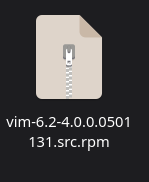
1765396772196.png
These are not just cgywin binaries but rather versions compiled exactly for windows so maybe even a exe version of vim?
1765396939903.png
Some appear to be untouched because they already support windows.

But some like VIM appear to be hand edited by them to make it work for windows

1765397257248.png
1765397268393.png
Wow all in one file.

They have a entire CD dedicated to documentation. And its not shitty either its more like tutorials
1765397420576.png
1765397490855.png
How interesting, a entire IDE to go along with it to. This could be what was used to make the TVS binary's and its also for linux as well.
1765397548948.png
All of these architectures you could easily build to with one click that's really cool.
AND THEY HAD ENTIRE CODE EXAMPLES
1765397594531.png
Some other stuff I found.

1765398127399.png
IS THAT WHAT I THINK IT IS?
1765398148698.png
IT IS!! I knew when they said embedded they supported embedded platforms. I mean it is 2004 commercial Linux software. But never would I guess they supported SO much that it would include the Nintendo 64.

Why is there so many stuff related to the Nintendo 64?
1765398466608.png
1765398466587.png
Hold up a second let me check something.
1765398573167.png
DAMN
Of course where are my manners
here its pretty much abandon-ware.

Thats all I have for now. This GCC may be to old for it to work or may not support mipsel. But its a interesting read.
 

Attachments

  • 1765398351499.png
    1765398351499.png
    24.3 KB · Views: 8
  • 1765398365258.png
    1765398365258.png
    6.1 KB · Views: 5
  • 1765398441445.png
    1765398441445.png
    6.1 KB · Views: 2
  • 1765398441440.png
    1765398441440.png
    6.1 KB · Views: 2
  • 1765398551822.png
    1765398551822.png
    3.4 KB · Views: 10
Last edited:

In my old 2018 vidya laptop I run Fedora, but on my "Megafucker 4K@120fps in glorious HDR" PC I still run Win11, solely because of HDR. No complaints really, I just use it for vidya and it does its job, but it'd be nice to play vidya on Linux, for a change.

I am counting the days until HDR runs great in Linux so I can finally jump ship.
 
Now imagine someone professionally writing ASPX.NET in vim for Windows. That's me. Hi. (Yeah, my boss thought I was a psycho too. He may have been onto something.)
I resemble that remark (at least I did around the 2008-2011 era).
 
Its called SRPM which most likely means simulated RPM and would run on windows 2000
1765396752737.png
Precompiled versions of VIM for windows. Now that is fucking cursed. What future serial killer is using vim on windows.
1765396772196.png
From what I'm aware, src.rpm files are basically the equivalent of Debian source packages- if so then they basically contain the original base version of an upstream package, plus patch files to make any changes for the building of binary rpms (which could be to C/C++ code etc for some compatibility reason, or to Makefiles to alter where things get installed/link libraries to, that sort of thing). Still, certainly useful to have.
 
After thinking about it for a second. This is completely insane to me.

With how nix, and as far as I know guix would handle this in the same, or a similar way. They are both so much more bloated than a system would otherwise be using a normal package manager. They can sometimes save some space on your disk with hardlinking. But you have this huge store of packages, with multiple versions of everything you need, especially if you have multiple derivations for backups. I would say you are going to take up significantly more disk space, for the same thing you would be using, but it's all shoved into the store. and split up there. instead of an organized complete filesystem structure you would expect.
The system itself does not store multiple versions of everything as the release cycle work exactly like in normal distro(at least for Guix) - it will only after you tell it to. While store will get large over time it is only because it doesn't automatically remove the old packages once you however run the GC you will soon discover that 32GB of packages that you had is in reality 12GB. As for derivations they are in essence build files and as such do not take much space. They are less bloated overtime because the process of installing and uninstalling packages is guaranteed to be reversable and thus long running system will accumulate less garbage in the form of old /etc/ and partially uninstalled packages.
When you update you update the whole store at once, so it's a giant download. So that's definitely not lighter.
No you don't - the update model is the same as normal distros you only download delta between updates. You are confusing it with immutable distros which indeed are nigger ware
You will probably have more runtime junk going on because of how these distros work (like the nix-daemon which consistently was using 1gb of memory every time I looked at it, or whatever other runtime setup needs to get done on guix).
Guix uses 13MB when idling - and it does no work unless requested by user. No runtime maintanence is required.
To me it feels way more bloated, messy, and complicated than a normal linux distro. I would say those distros are more bloated in every way except cpu usage in comparison to just running something like void, arch, or maybe alpine. Or gentoo if you are going to compile programs.
While Guix and Nix are conceptualy more complex the guarantees that they provide like the ability to always go back in time, everything being derived from manifest etc make them less messy conceptualy as you no longer need to worry that the depedencies of the program that you want to install will shit up your entire system and perhaps break your desktop because it uses older version of some popular liblary that is incompatible with never ones.
Additionaly while Guix CLI is poorly thought out and it is slow to use(mostly due to guile) - it is not inherent to the design itself and can be improved upon.
Oh yeah, also god forbid if you for some reason want to change something about a package, and dive into what would normally be in the /usr directory. You're just going to have to make the package yourself with whatever alterations you want to make, because otherwise there is no practical way to do it.
Thats is indeed annoying and major drawback of the way that they are designed.
 
I've been giving desktop Linux a fair go for the past week or so. Last time I tried desktop Linux was on a laptop a couple of years, and I quickly got frustrated and went back to Windows 11. This time around I built PC specifically for testing. I purchased a cheap AM4 processor + mobo bundle, along with some RAM, and reused some spare components. Fortunately I had a spare RX 6600, so didn't have to worry about any potential Nvidia driver issues.

The distro I'm most familiar with is Fedora. I run it on a few VPS servers and LXC containers, so played around with Fedora KDE, some of the spins in VMs. I settled on Fedora KDE since it was closest to my Windows 11 environment. On Windows I make heavy use of Flow Launcher and FancyZones, and KDE provides similar functionality out of the box and with the same key bindings. I did also look at OpenSUSE Tumbleweed, but it didn't seem to be as well intergrated with KDE as Fedora.

Straight off the bat, I installed Snapper to take regular Btrfs snapshots. This seemed like a wise default that OpenSUSE had - I figured it was good protection against any potential broken package updates and anything retarded I might do. Installing multimedia codecs with hardware decoding wasn't too time consuming, but prefer if they came included out of the box. But understand Redhat wanting to avoid legal issues doing so.

Seemed to be going well so far, but I got rattled reading about some recent broken KDE updates, along with a Mesa update that got pushed through as 'stable' even though it broke Steam: https://discussion.fedoraproject.or...o-stable-mesa-25-2-7-2-fc43-reasonable/173585

I decided to give OpenSUSE Leap as I'd prefer avoiding broken shit, but still have relatively up-to-date software. But it ended up having it's own issues. I couldn't get Firefox working with hardware decoding, unless I used the Flatpak. And trying to install Steam caused a bunch of package conflicts. Solution was to install the Flatpak, but at that point I decided to go back to Fedora KDE - if broken packages cause issues, I can always rollback with Snapper.

Pretty happy with my desktop Linux so far, but have a few annoyances that I've had:
  • On Windows I use a GUI program Fan Control for controlling my CPU and system fans. CoolerControl seems to be the go to equivalent on Linux, but for my mobo I had to download and install a kernel module from Github to be able to control the fan speeds.
  • I initially set up Terra repos from Ultramarine as there's some useful software from there. But their package for PeaZip broke and I couldn't get it working again. The official PeaZip RPM packages seem to work fine though, so I nuked the Terra repos and will avoid them.
  • PeaZip doesn't seem to integrate with Dolphin well - I can't drag and drop files from PeaZip into Dolphin. Not a big issue I can just use Ark when I want to extract files.
  • The video players on Linux out of the box just aren't as good as the clsid2 fork of MPC-HC. But I've got MPV set up now to behave somewhat similar to my MPC-HC on Windows. Do appreciate how customisable it is and want to play around more with it in the future.
  • I installed Fedora KDE on another computer with an Nvidia GPU. I installed the akmod driver from RPM Fusion and in the terminal it 'finishes' installing, but the RPM Fusion web site recommends waiting 5 minutes before rebooting because it's silently compiling the kernel module in the background. This might Fedora specific, but seems kind of insane it appears to install when it actually hasn't and doesn't indiciate otherwise in the terminal.
Anyway, I'm going to stick with Windows 11 for gaming and use Linux for general use. KDE is comfortable for me coming from Windows, but is more clean. For gaming Windows is simply going to work better out of the box and there's games like BF6 I play that simply won't run on Linux.
 
I installed Fedora KDE on another computer with an Nvidia GPU. I installed the akmod driver from RPM Fusion and in the terminal it 'finishes' installing, but the RPM Fusion web site recommends waiting 5 minutes before rebooting because it's silently compiling the kernel module in the background. This might Fedora specific, but seems kind of insane it appears to install when it actually hasn't and doesn't indiciate otherwise in the terminal.
Thats definitely a fedora specific thing.

My recommendation to be able to tell when its actually done is pull up htop, or btop. Or a gui system resource monitor. You will be able to see if its compiling still in that.
 
Back
Top Bottom