On that note, what do (You) think of something like
AtlasOS? I am in need of a Windows machine but loathe to install any stock version, so I'm looking at this and tiny11 to find one stripped of (some of) its telemetry.
AtlasOS seems to be somewhat inactive and also it's been known for going too far in it's debloating. Tiny11 you should only use if you use the
Tiny11 Builder, downloading a random modified ISO from the Internet is generally a very bad idea. Also IIRC Tiny11 cuts out a good chunk of the OS as well so YMMV with how broken it may end up.
My recommendation would be to use
WinUtil, either to run post-install or to use it to build a MicroWin ISO, which is more or less stock Windows but with most of the front facing BS removed and install that, but then again that requires Windows to be built. I trust Chris' work the most since he makes it very clear that WinUtil and MicroWin are not meant to go any deeper than they need to for you to have a good Windows experience, and it's the most popular "debloat" script around, meaning it's in active development and it has many eyes on it.
Obviously you can then use
Microsoft Activation Scripts to remove the nag watermark and unlock personalization options. If you don't trust it (and you shouldn't),
you can perform manual activation as instructed.
Alternatively you can use an
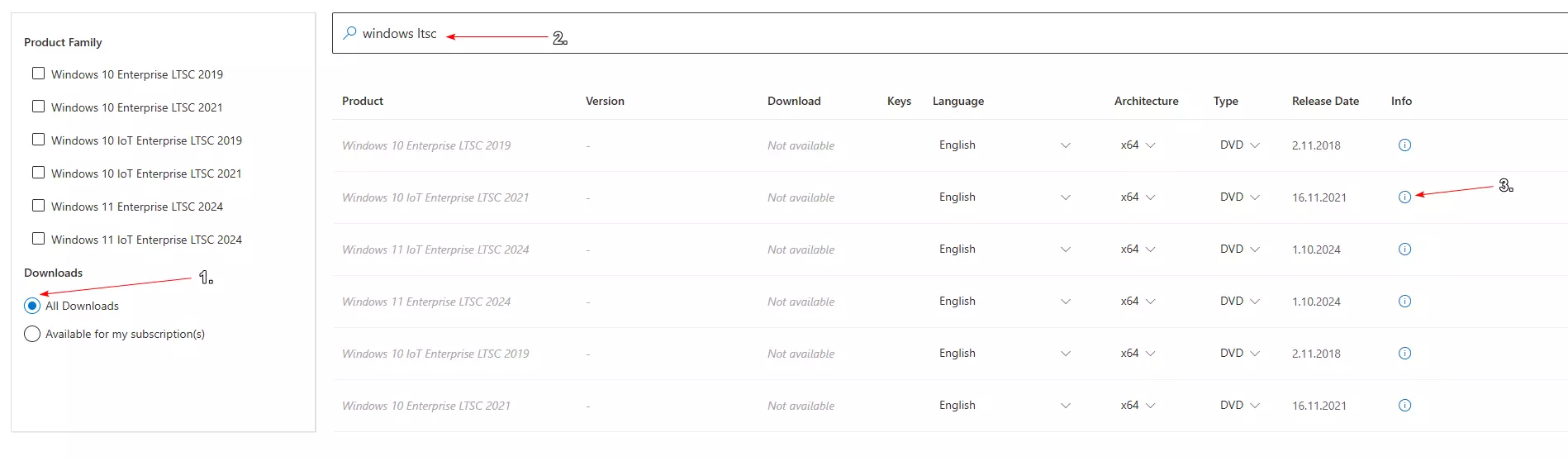
IoT LTSC version. Be sure to check the ISO's you download against
Microsoft's official SHA256 hashes like so (free Microsoft account required):
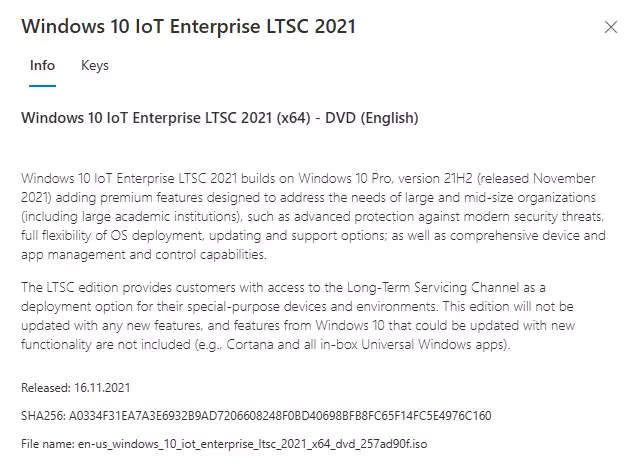
Windows 10 IoT LTSC 2021 is Windows 10 21H2 that's supported until 2032 if you want to stay on an older version, and Windows 11 IoT LTSC 2024 is Windows 11 24H2 that's supported until 2034. Note that what you're getting with LTSC is a long term support version frozen at a given feature update and a bit less crap installed by default, but you don't gain some magical performance boost or zero telemetry. You want to use it if you don't want to have a feature update change or break something in two years, but want to keep your OS up to date on all the security fixes. This of course has it's own caveats like newer software potentially breaking due to it abandoning older Windows versions but it's up to you to decide.
One thing that you have to keep in mind is that there is no way to fully cut out the telemetry. If that's your main concern and you have no other choice but to use Windows then keeping it offline, or at the very least putting it in an air-gapped network is what you want to do to minimize the impact. What you're looking with a modified Windows ISO or a Windows "debloater" is just a light touch-up to make it a bit more pleasant to use by removing and disabling unnecessary elements without messing with the OS too deep to ensure stable operation.