Navigation
Install the app
How to install the app on iOS
Follow along with the video below to see how to install our site as a web app on your home screen.
Note: This feature may not be available in some browsers.
More options
Style variation
You are using an out of date browser. It may not display this or other websites correctly.
You should upgrade or use an alternative browser.
You should upgrade or use an alternative browser.
Feedback Technical Grievances
- Thread starter Null
- Start date
-
Want to keep track of this thread?
Accounts can bookmark posts, watch threads for updates, and jump back to where you stopped reading.
Create account


- Joined
- Apr 11, 2023
There is a front end instance where the openresty version isn't blanked out like I'm used to. IDK if this is a problem or not, but it feels vaguely unhygienic in terms of data sanitation. The few times I've seen a 504 or whatever, I usually don't see a version number. But who knows. Maybe this is normal. I can't RTFM here.

- Joined
- Nov 14, 2012
That has meaning to me, don't worry about itThere is a front end instance where the openresty version isn't blanked out like I'm used to. IDK if this is a problem or not, but it feels vaguely unhygienic in terms of data sanitation. The few times I've seen a 504 or whatever, I usually don't see a version number. But who knows. Maybe this is normal. I can't RTFM here.

- Joined
- Nov 17, 2024
Is there just something up with clicking a link to this site from somewhere else or is it just a me problem? I encountered this before with Archive.is and how clicking on any link there that wasn't archived and that would try and bring me to the page/thread itself would just throw me to that "Page could not be loaded" page. I posted about this before ITT. I'm bringing it up again because I recently faced to same issue with Google Images and Yandex images. I was reverse-searching a users avatar and one of the results I got from both sites were Kiwi Farms threads themselves. Clicking on the threads led me back to the page could not be loaded screen which means that it isn't just an Archive.is issue.
Maybe something is up with referrers or...? I have no good guesses.
Maybe something is up with referrers or...? I have no good guesses.

- Joined
- Nov 21, 2020
Works fine for me. (Clearnet, Chromium browser, with VPN)Is there just something up with clicking a link to this site from somewhere else or is it just a me problem? I encountered this before with Archive.is and how clicking on any link there that wasn't archived and that would try and bring me to the page/thread itself would just throw me to that "Page could not be loaded" page. I posted about this before ITT. I'm bringing it up again because I recently faced to same issue with Google Images and Yandex images. I was reverse-searching a users avatar and one of the results I got from both sites were Kiwi Farms threads themselves. Clicking on the threads led me back to the page could not be loaded screen which means that it isn't just an Archive.is issue.
Maybe something is up with referrers or...? I have no good guesses.

- Joined
- Sep 22, 2021
It appears to be fixed, thanks!I have a report from at least one user of the reply box missing from all posts across multiple devices and browsers, so it seems like you're not alone

- Joined
- Mar 21, 2023
I'm having trouble uploading videos, the progress bar gets stuck at 100% and doesn't insert them, I can sometimes fix it by reloading the page but that doesn't always work. I've had the same results using both Tor and Brave.
Came to the Technical Grievances thread to check for other reports & chime in that I've having the same 100% video loaded progress bar hangup where it get stuck and never embeds when trying to upload even small & medium size videos (less than 30 MBs) on Brave browser desktop.
Sometimes if you wait minutes & minutes, it will eventually embed properly. Other times if you reload, it's unclear if it actually embedded and uploaded properly because the video file appears in the Attached Files tray, but with a blacked out thumbnail.
A month plus ago over the summer, I was having an issue similar to other users where small & medium video uploads weren't able to be uploaded at all because they would fail at seemingly random times along the progress bar. I have to say that the video uploads themselves haven't been doing this lately and are much smoother.
It seems to be that the problem now is simply hanging up on the final embed step.


- Joined
- Jan 23, 2022
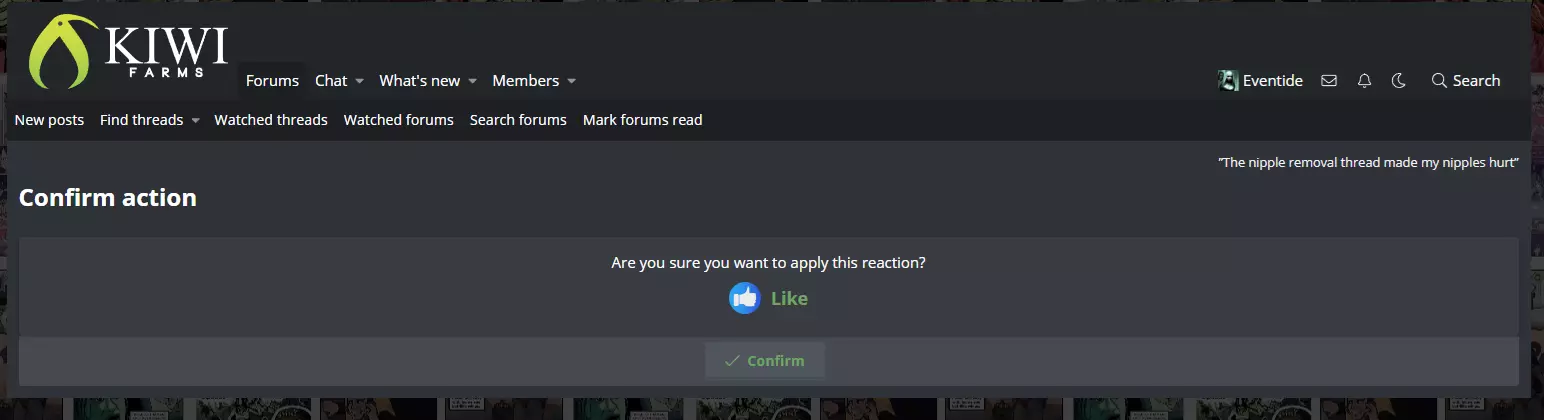
Did I lose the ability to use stickers, or is it a glitch?
I tried to give someone some thumbs up updoots in the politics thread, and I was greeted with this weird screen:
Edit:
It seems to be an issue specific to the US Politics thread. I haven't posted in there/stickered anything in that thread for awhile, so I somewhat doubt it's a punishment.
Edit: I was able to get my post go through, and my stickers to go through without that weird screen popping up - the issue seems to be gone now ¯\_ (ツ)_/¯
I tried to give someone some thumbs up updoots in the politics thread, and I was greeted with this weird screen:
Edit:
It seems to be an issue specific to the US Politics thread. I haven't posted in there/stickered anything in that thread for awhile, so I somewhat doubt it's a punishment.
Edit: I was able to get my post go through, and my stickers to go through without that weird screen popping up - the issue seems to be gone now ¯\_ (ツ)_/¯
Last edited:

- Joined
- Aug 7, 2021
This has been brought up a few times in this thread. As I understand, this will happen if the JavaScript has not yet fully loaded or failed to load. Without JS, interactive elements such as reactions won't work, and instead the site will fall back to Web 1.0 click-throughs. This is called graceful degradation.Did I lose the ability to use stickers, or is it a glitch?
I tried to give someone some thumbs up updoots in the politics thread, and I was greeted with this weird screen:
View attachment 7890113
Edit:
It seems to be an issue specific to the US Politics thread. I haven't posted in there/stickered anything in that thread for awhile, so I somewhat doubt it's a punishment.
Edit: I was able to get my post go through, and my stickers to go through without that weird screen popping up - the issue seems to be gone now ¯\_ (ツ)_/¯

- Joined
- Mar 25, 2024
YouTube sucks and video links fail to play with error 153. Seems to have started after the recent config adjustments, of course.


Edit: Link to post


Edit: Link to post
- Joined
- Nov 21, 2020
Did someone forget to pay the Internet bill?
DOMAIN: kiwifarms.st
REGISTRATION-SERVICE-PROVIDER: ST Registry
URL: www.nic.st
created-date: 2022-09-10 09:17:56
updated-date: 2025-09-11 00:42:08
expiration-date: 2025-09-10 09:17:56
$ dig kiwifarms.st NS @west-2.dns-us.st.
;; Got answer:
;; ->>HEADER<<- opcode: QUERY, status: NXDOMAIN, id: 5309
Looks like all the common public DNS still has it cached, but my system avoids all those and lost resolution almost immediately.
.st:

.net:

DOMAIN: kiwifarms.st
REGISTRATION-SERVICE-PROVIDER: ST Registry
URL: www.nic.st
created-date: 2022-09-10 09:17:56
updated-date: 2025-09-11 00:42:08
expiration-date: 2025-09-10 09:17:56
$ dig kiwifarms.st NS @west-2.dns-us.st.
;; Got answer:
;; ->>HEADER<<- opcode: QUERY, status: NXDOMAIN, id: 5309
Looks like all the common public DNS still has it cached, but my system avoids all those and lost resolution almost immediately.
.st:

.net:

Last edited:

- Joined
- Aug 28, 2019
I guess that's why I needed to turn on a VPN to get back in.Did someone forget to pay the Internet bill?
DOMAIN: kiwifarms.st
- Joined
- Nov 14, 2012
They only take PayPal. I've been asking for IBAN details for 3 days.Did someone forget to pay the Internet bill?
Just got someone to pay it for me. Should start propagating.

- Joined
- Jul 11, 2022
Minor issue, no big deal since I have a work around, but it's weird enough to be noteworthy.
My set up is two laptops. Laptop A has two browsers, Primary Browser for general websurfing, KF, YouTube, etc, and Secondary Browser for emails, payments, and shopping. Laptop B has the same set up because its my old laptop, but these days it only runs Primary Browser as a second screen equivalent.
Right now KF does not work on Laptop A Primary Browser, but it works fine on Secondary Browser and Laptop B Primary Browser.
Laptop A Primary Browser just gives me this:

I've tried resetting the browser, no luck.
EDIT: This was ongoing for hours before I decided to post about it, but now it works again.
My set up is two laptops. Laptop A has two browsers, Primary Browser for general websurfing, KF, YouTube, etc, and Secondary Browser for emails, payments, and shopping. Laptop B has the same set up because its my old laptop, but these days it only runs Primary Browser as a second screen equivalent.
Right now KF does not work on Laptop A Primary Browser, but it works fine on Secondary Browser and Laptop B Primary Browser.
Laptop A Primary Browser just gives me this:

I've tried resetting the browser, no luck.
EDIT: This was ongoing for hours before I decided to post about it, but now it works again.
Last edited:

- Joined
- Jun 12, 2020
FYI Incognet supports .st registrations these days and you can use crypto with them.They only take PayPal. I've been asking for IBAN details for 3 days.
Just got someone to pay it for me. Should start propagating.