New Media Processor is Running

That is damn slick. I can't even find something to complain about.

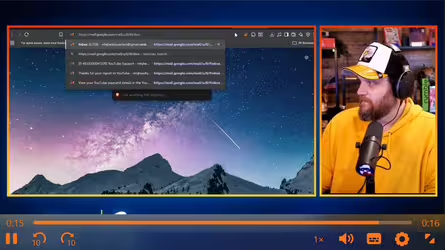
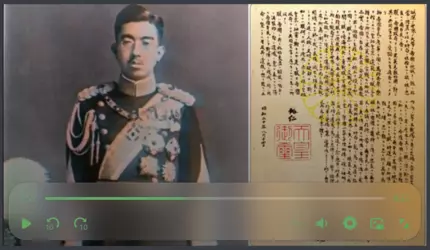
But on the "weird" side... the 2nd video you posted doesn't have a closed caption option when embedded.
1777689170458.png

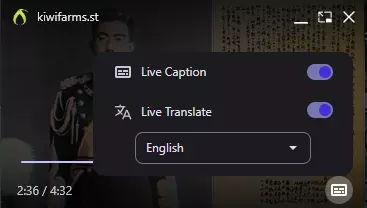
However if you switch to PiP, the mini player DOES have a CC option.
1777689252212.png1777689285753.png

But selecting it, with or without Live Translate, doesn't actually do anything.
 
Now that's fucking clean. As much as I bemoan JeetScript, I'll never get over how you can just find a lib with exactly what you're looking for that let's you basically drag and drop with minimal tweaking and it just works while looking incredible. For the media-control overflow on vertical videos, it might be good to make a separate media-control element positioned at the top of the video for the second media-button-group (although I'd keep the fullscreen button with the playback controls in the first group) that only renders after a certain aspect ratio (maybe 1:1?).
 
How is the default subtitle language picked? I keep getting the German one by default. I also think there should be a setting to pick default language / choose what language to show in options if this isn't too much work since realistically most people aren't gonna use more than 2.
 
I really do not like the new video front-end. It takes up too much space on the video and blocks a good portion of it. I also think that it can only be enjoyed by mobile fags. I enjoyed the previous video front-end.
For something that is Liquid Glass, it is Liquid Ass for me.

This post in the Tarl thread shows the gui taking up most of the bottom part which obstructs his body, leaving only his face.
1777705892087.png
 
1777708496384.png
Just in case I didn't just catch you in the middle of a roll-out, it looks like complete fuck here (but I also do complete fuck things with the firefox codebase locally, so unless others have the same issue I'll debug it myself).

eta: it works just fine, it's just styling. and only error/warning in the console is failing to load infinite-scroll.js, which looks unrelated.
 
Last edited:
For something that is Liquid Glass, it is Liquid Ass for me.
After using the player a bit more on desktop, the height of the rectangle could definitely be reduced and the icons compacted together a bit more to waste less space, as there is plenty of padding between all the various elements and the edge of the video frame. The objective of a video player is to watch the video, not look at the playback settings during playback. I find myself fullscreening videos more often with the new player as the bar blocks a tad bit too much screen real estate. For me this is because the default window size in posts is relatively small and the toolbar takes up around 1/5th of the entire frame.
The general design, features and functionality are excellent, just shrink it down a bit.

As much as I dislike Macfags, the liquid glass in general is unobtrusive and shows what is behind the bar which is slightly better than a solid black background. The issue is that the implementation is almost too transparent (as shown below in the first image). The rounded corners are also absolutely unforgivable and should be reduced in radius or removed - they are straight from the Windows 11 jeet soydev design handbook.

Here is a random concept I came up with. Left is original, Middle is modified, Right is the original player. I cut the padding out between the bar and the edges of the frame and reduced wasted space. I am not sure how difficult it would be to actually implement in the player or how others feel about how close together the buttons are.
jer.pngEditedQuart.pngJapanese.png
Currently, the player on the left takes up ~26% of the screen. The concept one would only take up ~14.3% of the screen. That is a 45% reduction of wasted space!
 
Nice, thank you. Perhaps it was reported already, but the issue I have with the new player is that it is difficult to interact with the UI of it for us mobilefags.

Hitting play is difficult but doable but it seems impossible to pause the video for some reason. I think placing the controls under the video rather than over it would help, but I am not sure.
 
New player breaks completely when combined with the Dark Reader plugin.
1777710136174.png
Even without Dark Reader enabled the player functions way worse than the previous iteration in my browser. It's clunkier, the CSS doesn't line up properly,
1777710295763.png

and at times it results in total altbrowser death.
1777710374044.png
Is a toggle for compatibility in the cards? Because as it stands I'd need to do the same as
I am using an older browser, but images and media didn't have a problem being shown until now(new videos don't load for me either btw). Tried it on newer browsers and everything works fine, can't say I care enough to switch over to them so hopefully this gets fixed.
Maintaining multiple player options would be untenable and get laughably complex in a few years. For compatibility I suggest a compatibility option for video in account settings where it instead displays the old browser based player and if something doesn't work there either that's too bad and the user should upgrade their browser.

E: I wrote a small tampermonkey script so I'll just cope with that for now. If anyone is dealing with the same thing shoot me a message and I'll send it to you. Beware that this script relies on the main player div having the class ephyra-media and the fallback video being stored in the attribute data-fallback.
 
Last edited:
>insane tranny murdering Internet racist, operating White supremacist darknet webzone reliant on patchy donations from his fellow terrorists, creates media player that mogs those created by multi billion dollar tech giants into orbit
Liz Dong-Gone has no idea what he has unleashed.
 
Am I fucking fried or is there no option to save/download videos without digging through inspect elements?
1777718983022.png
 
I'm experiencing issues with the volume slider. It doesn't show at all in normal mode:


...and doesn't show in the right spot (I assume it's supposed to appear above the speaker button) in fullscreen mode.


I use Windows 10 and Firefox 145 with lots of addons and userscripts, but those things happen in troubleshooting mode with everything disabled as well.
 
I'm not a fan of the liquid (gl)ass style of the player, takes up way too much space, would much rather have the browser's native styling be in place and any additional options be moved to a custom context menu. The context menu should also have a download option there instead of the copy media URL option currently. Also would suggest adding a YouTube like "Stats for Nerds" with some debug information like codecs used and network bitrate and throughput, hls.js and dash.js provides APIs to get those.

I don't like M3U8 or at least that's what I'm being served, from my experience it's only useful for livestreams and dealing with legacy Apple devices, DASH is more mainstream and has a better choice of frameworks to choose from like dash.js, Shaka and rxPlayer.

Also I don't know if your stack or the captioning system even supports identifying different people but having text from different people styled in an alternate color via WebVTT styling would be a nice to have. Not sure how feasible it is currently.
 
I don't like M3U8 or at least that's what I'm being served
That's too fucking bad because massive files over byte range doesn't fucking work

But selecting it, with or without Live Translate, doesn't actually do anything.
Probably because Live Translate can't caption ceremonial Japanese. The video I posted is famous for its failures in communication, because nobody in Japan could understand it. He was speaking as he would to royalty and the peasants being firebombed had no idea what the fuck was going on.

Is the volume slider missing for anyone else?
Yes, confirmed that, sorry.
 
Back
Top Bottom